Voter ID correction online with Form 8: change name, photo, date of birth or address, shift your vote, or get a replacement card
To correct your voter ID, fill Form 8 on voters.eci.gov.in or the ECINET app: log in with your mobile and OTP, choose Form 8, tick Correction of entries, select what to change (name, photo, age/DOB, relative's name, gender), upload a self-attested proof, and submit. Note the reference number to track it. The same form is used to shift your vote to a new address, get a replacement EPIC, or be marked as a person with disability. After approval a new EPIC card is issued.
Key facts Last verified: 29 Oct 2026
| Item | Details | Source |
|---|---|---|
| Form | Form 8 — shifting of residence, correction of entries, replacement EPIC, marking as PwD | Election Commission (Form 8 guidelines) |
| Where | voters.eci.gov.in or the ECINET mobile app; or at the Electoral Registration Officer / BLO | Voters' Service Portal |
| Proof | Self-attested copy of a document supporting the change; new photo 4.5 cm × 3.5 cm, white background | Form 8 guidelines |
| After approval | New replacement EPIC issued; old EPIC to be returned | Form 8 guidelines |
| False declaration | Punishable under section 31, Representation of the People Act 1950 (up to 1 year, fine, or both) | Form 8 guidelines |
| Helpline | 1950 (toll-free) | Election Commission |
Deepak's voter card from 2012 spells his surname "Jadav" instead of "Jadhav", and the photo is from his college days. He also moved from Nashik Road to Pune last year. He thought he needed three different forms. He needs one — Form 8 — but he must choose the right option inside it.
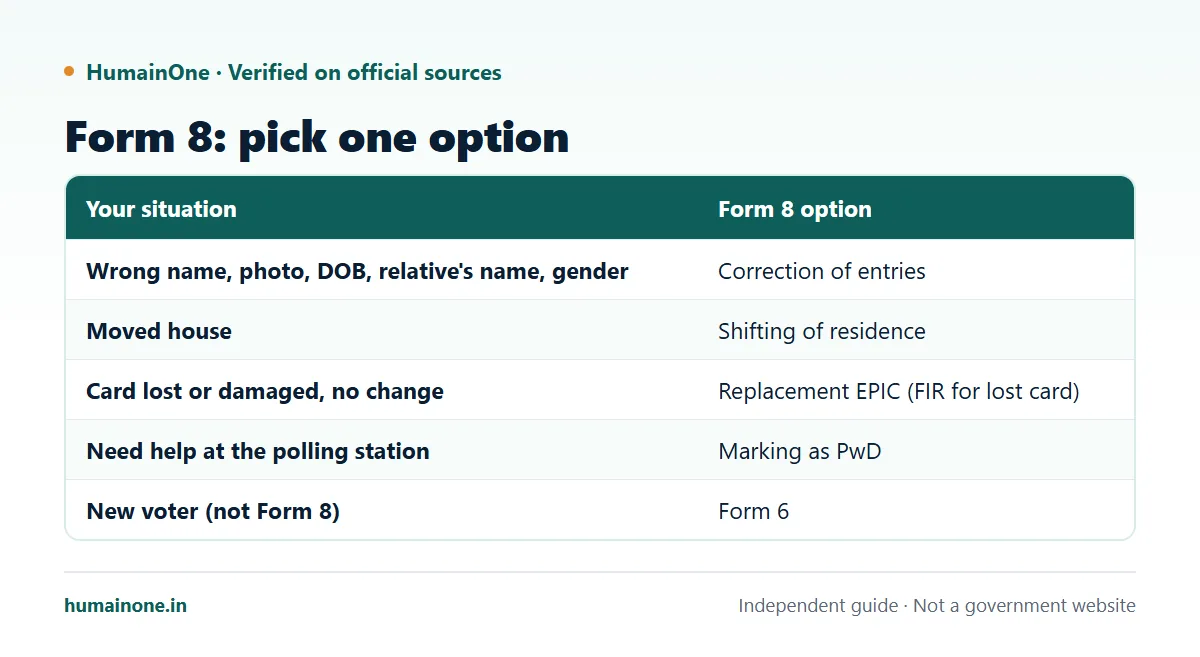
Which Form 8 option do you need?
| Your situation | Form 8 option | Proof to attach |
|---|---|---|
| Spelling of name, photo, date of birth/age, relative's name, gender | Correction of entries | Document supporting the correct detail (e.g. Aadhaar, birth certificate, school certificate) |
| You moved house — to a new address in the same area or another town | Shifting of residence | Address proof at the new address in your name or a parent's/spouse's name |
| Card lost, torn or damaged, no change in details | Replacement EPIC | Return the damaged card, or attach an FIR / police report for a lost card |
| You want to be marked as a person with disability for polling help | Marking as PwD | Disability certificate |
New voter? That is Form 6, not Form 8. Name missing from the roll after a revision? See the Maharashtra SIR voter list guide.
Form 8 online: step by step
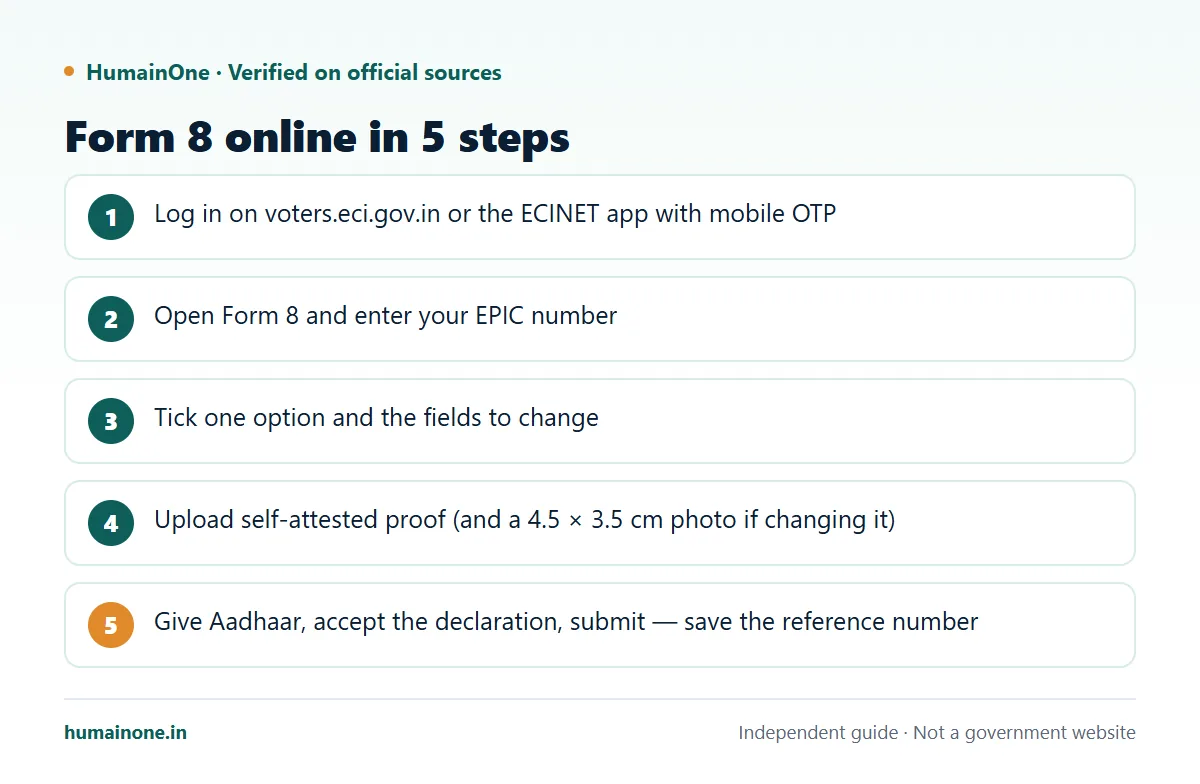
- Open voters.eci.gov.in (or the ECINET app) and log in with your mobile number and OTP. New user? Sign up first.
- Click Form 8 and enter your EPIC number. Your current details load.
- Tick the option you need — for Deepak, Correction of entries and then the fields Name and Photograph.
- Type the correct details exactly as in your proof. Upload a self-attested copy of the supporting document and, for a photo change, a recent colour photo (4.5 × 3.5 cm, white background, unsigned).
- Enter your Aadhaar number for authentication (or tick that you don't have one), check the declaration, and submit. Save the reference number shown.
Shifting and correction together? Each Form 8 application takes one option, and unused sections are struck off. Deepak should first file Shifting of residence to move his vote to Pune — it goes to the Electoral Registration Officer (ERO) of the new constituency. Once that is approved, he files a second Form 8 for Correction of entries (name and photo).
After you submit
- Track it on voters.eci.gov.in under Track Application Status with your reference number.
- A Booth Level Officer (BLO) may visit or call to verify.
- Once the ERO approves, the roll is updated and a new EPIC card is issued (sent to your address). Return the old card.
- You can download the corrected e-EPIC online — see voter ID card download.
Common mistakes
| Mistake | What happens |
|---|---|
| Uploading a blurry or unrelated document | Rejected; apply again |
| Using "correction" to change your address | Use shifting of residence instead |
| Filing Form 8 repeatedly for the same change | Duplicate applications delay approval |
| Wrong details in the declaration | A false statement is punishable under section 31 of the RP Act 1950 |
Also link your voter ID with Aadhaar (optional) using voter ID–Aadhaar link. For help, call 1950.
Frequently asked questions
Which form is used for voter ID correction?
Form 8. It covers correction of entries, shifting of residence, replacement EPIC and marking as a person with disability.
How can I change the photo on my voter ID online?
File Form 8 on voters.eci.gov.in or the ECINET app, tick Correction of entries → Photograph, and upload a recent colour photo of 4.5 × 3.5 cm with a white background.
How do I change my voter ID address to a new city?
Choose Shifting of residence in Form 8. The application goes to the Electoral Registration Officer of the constituency of your new address.
My voter ID card is lost. How do I get a new one?
Apply in Form 8 for a replacement EPIC without correction and attach a copy of the FIR or police report.
How do I check my Form 8 status?
Use Track Application Status on voters.eci.gov.in with the reference number you got after submitting.
Is there a fee for voter ID correction?
No. Filing Form 8 on the Voters' Service Portal is free.
Official links
Use only these government websites. HumainOne is not connected to any of them.
- Voters' Service Portal (ECI)Form 8, tracking, e-EPIC
- Form 8 guidelines (ECI)How to fill each option
- Form 8 (ECI, English)Offline form
Disclaimer: HumainOne is an independent information website. We are not affiliated with UIDAI, the Income Tax Department, EPFO, NPCI, the Election Commission, the Government of Maharashtra or any government body. We do not accept applications, documents or fees. Information is checked against official sources on the date shown but rules change — always confirm on the official website before acting. Calculators give estimates, not official figures, and this is not tax or legal advice.