Digital 7/12 utara: how to download the digitally signed Satbara for ₹15, check it is genuine, and fix common errors
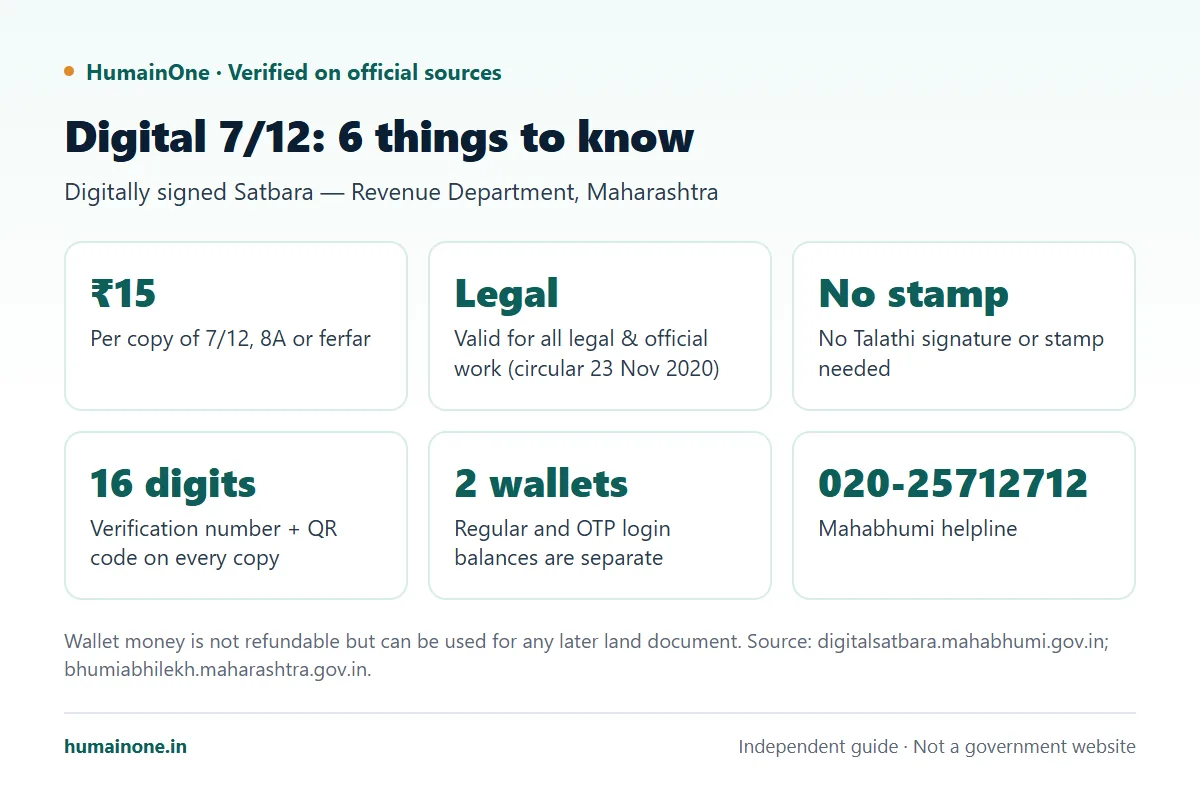
A digital 7/12 is the digitally signed Satbara issued by Maharashtra's Revenue Department on digitalsatbara.mahabhumi.gov.in. It costs ₹15 per copy (same for 8A and ferfar), paid from a small wallet you top up by UPI, card or net banking. You can log in with just your mobile number and OTP — no registration needed. Under the Revenue & Forest Department circular of 23 November 2020, a digital 7/12 with a QR code and 16-digit verification number is valid for all legal and government/semi-government work, and it needs no Talathi signature or stamp. The free 7/12 on Mahabhulekh is for information only — a bank or office can reject it.
Key facts Last verified: 18 Nov 2026
| Item | Details | Source |
|---|---|---|
| Fee | ₹15 per copy to download a digitally signed 7/12, 8A or ferfar | Bhumi Abhilekh FAQ (Revenue Dept) |
| Legal validity | Digital 7/12, 8A and Village Form 6 with QR code and 16-digit verification number are valid for all legal and government/semi-government work; no Talathi signature needed | Revenue & Forest Dept circular, Jamin-2020/Pr.Kr.31/J-1A, 23 Nov 2020 |
| Login | OTP-based login with mobile number (no registration), or regular login with user ID and password | Digitally signed Satbara portal |
| Wallet top-up | ₹15 to ₹1,000, ideally in multiples of 15; UPI, debit/credit card or net banking; not refundable | Digital Satbara Help (user guide) |
| Free view copy | 7/12 and 8A on Mahabhulekh are for information only; printouts are not accepted for any government or legal work | Settlement Commissioner circular, 19 Jun 2019 |
| Helpline | Mahabhumi / Bhumi Abhilekh: 020-25712712 | Mahabhumi |
Suresh, a farmer near Ahilyanagar, took a printout of his free online 7/12 to the bank for a crop loan. The bank sent him back: "Bring a digital 7/12." He thought that meant another trip to the Talathi. It didn't. Ten minutes on his phone and ₹15 later, he had a digitally signed Satbara PDF that the bank accepted without any stamp. This guide shows exactly how to do that, step by step, and what to do when something goes wrong.
What "digital 7/12" means (and why the free one gets rejected)
There are two kinds of online 7/12 in Maharashtra, and they look almost the same:
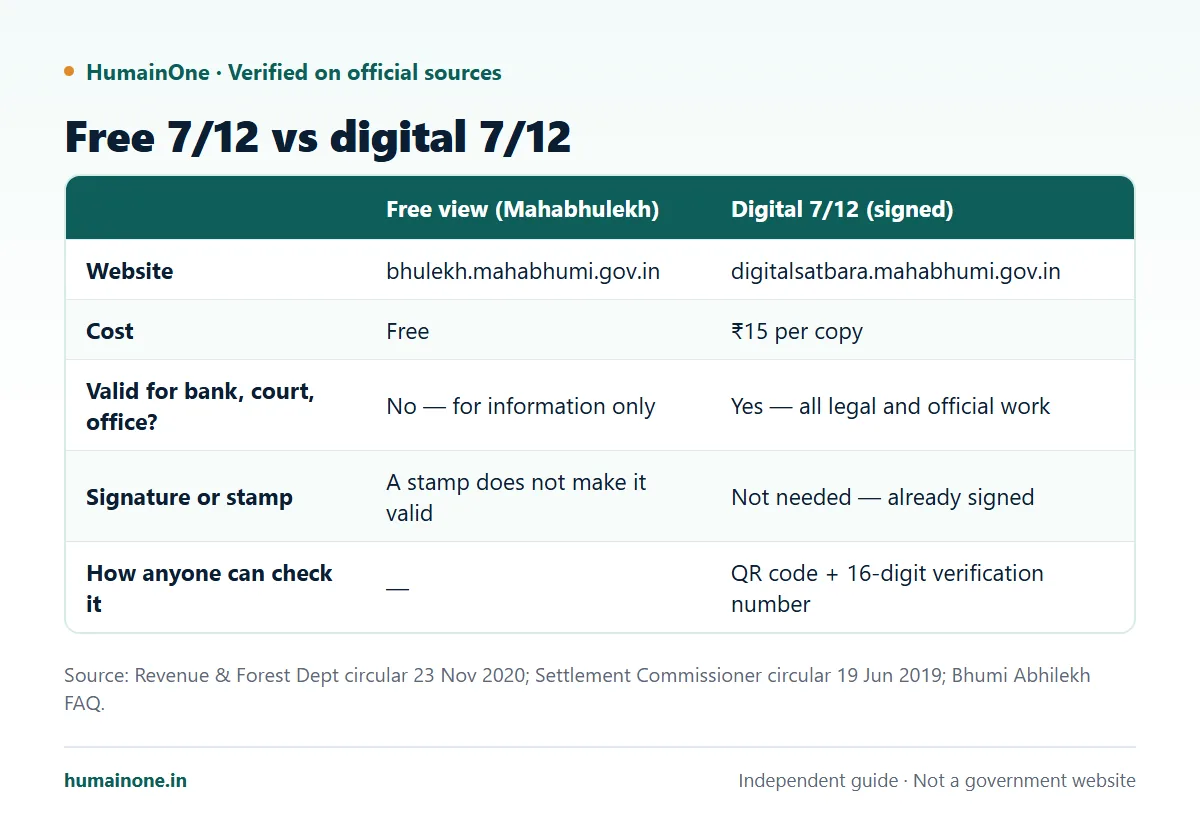
- Free view (Mahabhulekh) at bhulekh.mahabhumi.gov.in: good for checking your entries. A 2019 circular of the Settlement Commissioner says these unsigned copies are for information only and their printouts are not accepted for any government or legal work. It also says that Setu / Maha e-Seva / Sangram centres must not sign or stamp such printouts and sell them as valid copies.
- Digital 7/12 (digitally signed) at digitalsatbara.mahabhumi.gov.in: this is the legal copy. The page itself carries the digital signature, so no Talathi signature or stamp is needed.
Why it is legally valid: the Revenue & Forest Department's circular No. Jamin-2020/Pr.Kr.31/J-1A dated 23 November 2020, issued under the Information Technology Act, 2000 (sections 4–8) and the Maharashtra Land Revenue Code, 1966, says the digitally signed computerised 7/12, 8A and Village Form 6 from the Mahabhumi portal, with a QR code and a 16-digit verification number, are valid for all legal and government/semi-government work. It also says no signature of the Talathi or any other officer is needed on them.
Before you start: keep these ready
| You need | Why | Tip |
|---|---|---|
| District, taluka, village | To find your land | Village name as written in the records |
| Survey / gat number (for 7/12) | To pick the right plot | Don't know it? Search by name on the free Mahabhulekh 7/12 page first |
| Khata number (for 8A) | 8A is per account holder | It is written before the owner's name on the 7/12 |
| Mobile number | For OTP login | Any mobile you can receive an OTP on |
| ₹15 per document | Wallet payment | UPI, debit/credit card or net banking |
| Laptop, or phone in "Desktop site" mode | The portal is built for desktop | Official FAQ: on mobile, turn on desktop view in browser settings |
How to download digital 7/12: step by step
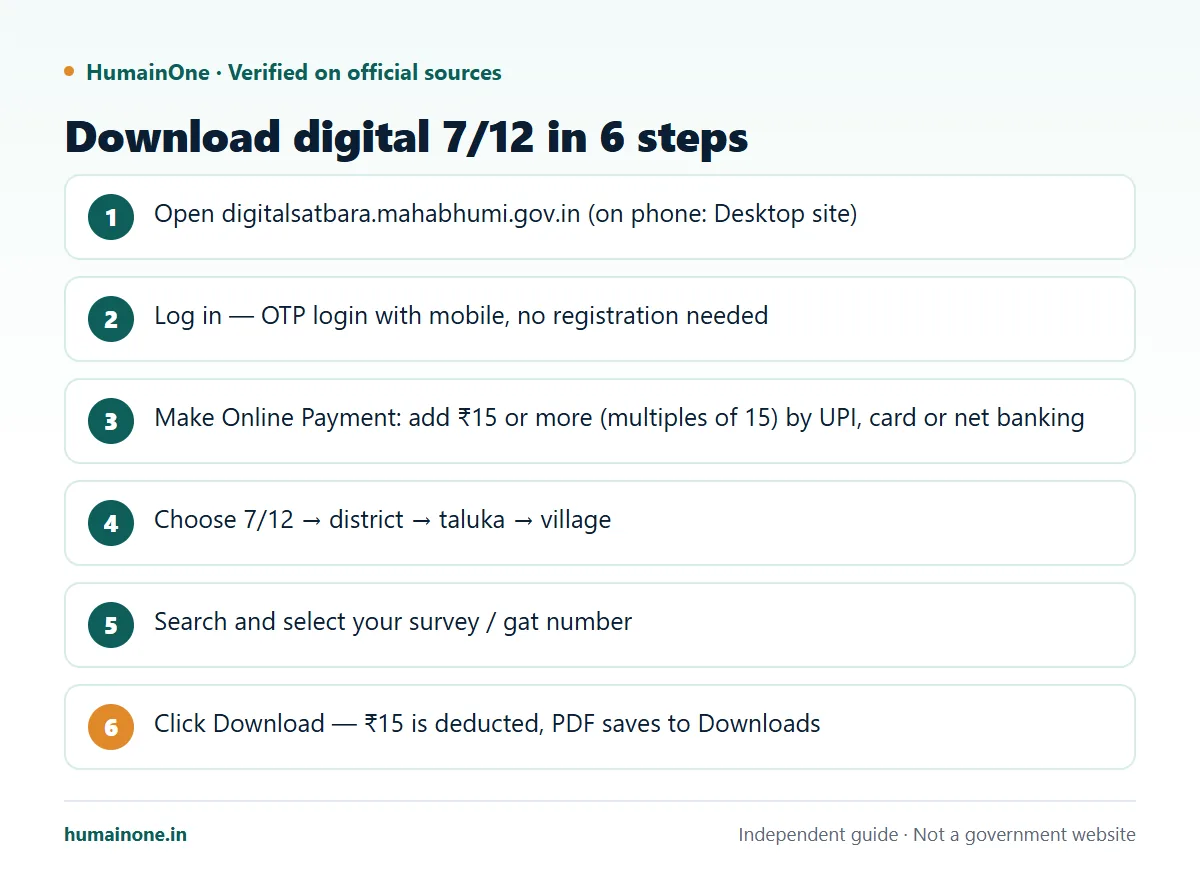
- Type digitalsatbara.mahabhumi.gov.in in your browser (on a phone, switch the browser to Desktop site first). Use only this address; it is a .gov.in site.
- Choose OTP Based Login, enter your mobile number and the captcha, tap Send OTP, enter the OTP and Login. No registration is needed. (Or use Regular Login if you have a user ID.)
- Go to Make Online Payment first. Enter an amount between ₹15 and ₹1,000 — the portal advises multiples of 15 (₹15 for one copy, ₹45 for three). Pay by UPI, card or net banking, then note down the PRN number on the receipt and click Continue.
- Choose 7/12, then select your district → taluka → village.
- Search your survey / gat number and select it.
- Click Download. ₹15 is deducted from your wallet and the digitally signed PDF is saved in your device's Downloads folder. Print it if the office wants paper — the printout of a digitally signed copy is fine.
Two logins, two wallets. Money added under OTP login is not visible under Regular login, and the other way round. Stick to one login method. Wallet money is not refundable, but it stays in your wallet for any later land document.
Digital 8A, ferfar and other documents
The same portal and the same wallet give you these too:
| Document | What you enter | Fee | Note |
|---|---|---|---|
| Digital 8A | District → taluka → village → khata number | ₹15 | Shows all land of one account holder in the village |
| Digital ferfar (mutation copy) | Village and ferfar number | ₹15 | Online ferfars start from 2016. Older ferfars are on e-Records (aapleabhilekh.mahabhumi.gov.in/erecords) |
| Digital property card | Region → district → office → village → CTS number | Shown on the portal | For city / non-agricultural property — see property card Maharashtra |
| K-Prat, MH Digi Maps | As shown on the portal | Shown on the portal | Listed on the portal's download page |
Applying for a new ferfar (sale, inheritance, loan) is a different process. See ferfar (mutation) in Maharashtra.
How to check a digital 7/12 is genuine
Banks and buyers can check any digital 7/12 in under a minute, and so can you:
- Find the 16-digit verification number printed on the digitally signed 7/12 (or 8A).
- On digitalsatbara.mahabhumi.gov.in, open the Verify 7/12 (or Verify 8A) option and enter that number.
- Download the verification copy and compare it with the paper you were given. If they don't match, don't rely on that paper.
You can also scan the QR code / barcode at the end of Village Form 7 on the 7/12. The official FAQ says it opens the digital Satbara portal so the record can be checked.
How to read your digital 7/12 quickly
These points come from the Bhumi Abhilekh FAQ:
- Khata number is written just before the owner's (occupant's) name.
- Ferfar number for each owner is in brackets ( ) next to the name. Old ferfar numbers are listed at the end of Village Form 7.
- Rejected ferfars appear among the old numbers in red, bold, slanted (italic) text.
- The number in brackets after the village name is the village's 6-digit LGD code (Local Government Directory code), used to identify the revenue village across India.
- When does it update? An ownership change shows immediately after the ferfar is decided. Crop entries change season by season (from e-Peek Pahani).
Problems and fixes
| Problem | What to do |
|---|---|
| Money debited from bank, but wallet balance not showing | Go to Payment Status → Check Payment Status and enter the PRN number. If the transaction was successful, the wallet updates. If it failed, contact your bank. |
| Paid with OTP login, balance missing in Regular login | Normal. The two wallets are separate and can't be merged. Log in the same way you paid. |
| Menus don't open on mobile | The site is a desktop application. Turn on Desktop site / desktop view in browser settings. |
| PDF opened once, now can't find it | Downloads are saved automatically in your Downloads folder. Open it from there; don't pay again. |
| Download fails or page stops | Usually an internet issue. Wait and try again. Your money stays in the wallet; it is only deducted after the file downloads. |
| Old ferfar number not available | Ferfars before 2016 are on e-Records (aapleabhilekh.mahabhumi.gov.in/erecords). |
| Regular login password not working | Passwords expire every 90 days. Use Forgot Password (login ID, secret question answer, date of birth) — or just use OTP login. |
| Wrong name, area or entry on the 7/12 | The digital copy shows what is in the record. Get the record corrected through e-Hakk — see how to correct 7/12. |
| Name on 7/12 doesn't match Aadhaar for Farmer ID | Fix the wrong record first — see Farmer ID Maharashtra. |
Stay safe: type the address yourself and check it ends in mahabhumi.gov.in. The Mahabhumi portal does not list a separate mobile app for digital 7/12, so be careful with apps that ask for payment. And remember the 2019 circular: a stamped printout of the free copy is not a valid 7/12, whoever stamps it.
Frequently asked questions
What is a digital 7/12?
It is the digitally signed 7/12 (Satbara) extract downloaded from digitalsatbara.mahabhumi.gov.in. It carries a digital signature, a QR code and a 16-digit verification number, and is valid for all legal and government/semi-government work.
How much does a digital 7/12 cost?
₹15 per copy. The same ₹15 applies to a digitally signed 8A and ferfar copy. You add money to a wallet on the portal and ₹15 is deducted when the file downloads.
Can I download a digital 7/12 without registration?
Yes. Use OTP Based Login with your mobile number. You only need registration if you want a user ID and password.
Is the digital 7/12 valid for a bank loan or court?
Yes. The Revenue & Forest Department circular of 23 November 2020 says the digitally signed 7/12 is valid for all legal and government/semi-government work and needs no Talathi signature. The free view copy from Mahabhulekh is not.
Does the digital 7/12 need the Talathi's signature or stamp?
No. Village Form 7 is digitally signed and the Village Form 12 data is self-certified, so no signature or stamp is needed.
I paid but the money is not in my wallet. What do I do?
Log in, open Payment Status, use Check Payment Status and enter the PRN number. If the bank shows the payment as failed, contact your bank.
Can I get a refund of the wallet money?
No. It is treated as an advance. You can use it later for the same or any other land document.
How do I verify a digital 7/12 someone gave me?
Enter the 16-digit verification number from the 7/12 in the Verify 7/12 option on digitalsatbara.mahabhumi.gov.in and compare the verification copy, or scan the QR code on the document.
How do I download a digital 8A?
On the same portal, choose 8A, select district, taluka and village, enter the khata number and click Download. It costs ₹15.
Why can't I find an old ferfar on the digital 7/12 site?
Online ferfars start from 2016. Older ferfars are available on the e-Records site, aapleabhilekh.mahabhumi.gov.in/erecords.
Official links
Use only these government websites. HumainOne is not connected to any of them.
- Digitally signed 7/12, 8A, ferfar, property card₹15 per copy; OTP login
- Digital Satbara user guide (Help PDF)Login, payment, download, verify
- Circular 23 Nov 2020 — legal validity of digital 7/12, 8ARevenue & Forest Department
- Circular 19 Jun 2019 — free view copies not validSettlement Commissioner, Pune
- Bhumi Abhilekh (FAQ, services, e-Hakk)Helpline 020-25712712
- e-Records (old ferfars, archived documents)Before 2016
- Mahabhulekh — free view onlyNot for official use
Disclaimer: HumainOne is an independent information website. We are not affiliated with UIDAI, the Income Tax Department, EPFO, NPCI, the Election Commission, the Government of Maharashtra or any government body. We do not accept applications, documents or fees. Information is checked against official sources on the date shown but rules change — always confirm on the official website before acting. Calculators give estimates, not official figures, and this is not tax or legal advice.