PM Surya Ghar Muft Bijli Yojana: rooftop solar subsidy up to ₹78,000, who can apply, and the steps till the money reaches you
PM Surya Ghar: Muft Bijli Yojana gives households a subsidy for rooftop solar: ₹30,000 per kW for the first 2 kW and ₹18,000 for the 3rd kW — ₹78,000 maximum for 3 kW or more. A 3 kW system can produce over 300 units a month on average. Any household with its own residential electricity connection can apply on pmsuryaghar.gov.in, pick a registered vendor, and get the subsidy in its bank account after net metering and inspection. The portal says the scheme closes on 31 March 2027.
Key facts Last verified: 29 Oct 2026
| Item | Details | Source |
|---|---|---|
| Subsidy | ₹30,000/kW for first 2 kW; ₹18,000 for the additional 1 kW; no subsidy beyond 3 kW | MNRE criteria (PIB annexure) |
| Maximum | ₹30,000 (1 kW), ₹60,000 (2 kW), ₹78,000 (3 kW or more) | Cabinet decision (PIB 2010130) |
| Who | Any consumer with a residential connection of the local DISCOM | MNRE criteria (PIB annexure) |
| Loan | Collateral-free loans of around 7% for systems up to 3 kW (at launch) | Cabinet decision (PIB 2010130) |
| Last date | Scheme closes 31 March 2027 | National Portal |
| Progress | 54.4 lakh rooftop systems installed (as on 28 Oct 2026) | National Portal |
Prakash in Nagpur pays about ₹2,800 a month for electricity in summer. A solar installer quoted ₹1.9 lakh for a 3 kW rooftop system and said "the Government pays ₹78,000 back". Both statements can be true — but only if he applies through the National Portal and uses a registered vendor. Here is how it works.

How much subsidy you get
| System size | Central subsidy (general states) | Special category states* |
|---|---|---|
| 1 kW | ₹30,000 | ₹33,000 |
| 2 kW | ₹60,000 | ₹66,000 |
| 3 kW or more | ₹78,000 (maximum) | ₹85,800 |
*Higher rates (₹33,000/kW and ₹19,800/kW) apply only in states and UTs listed as special category by MNRE. Households in Maharashtra get the general rates.
Housing societies (GHS/RWA) get ₹18,000 per kW for common facilities including EV charging, up to 500 kW (counted at 3 kW per house).
How much to install? Look at your monthly units on the electricity bill and use the size calculator on the National Portal. A 3 kW system generates over 300 units a month on average; actual output depends on your location, roof direction and shade. Extra units go to the grid through the net meter, reducing your bill.
Who can apply
- You must have a residential electricity connection in your name with the local DISCOM (in most of Maharashtra, Mahavitaran/MSEDCL).
- You need a roof, terrace or balcony (or elevated structure) suitable for the panels.
- The subsidy is for new installations through the scheme, using a vendor registered on the portal for your DISCOM.
Steps from application to subsidy
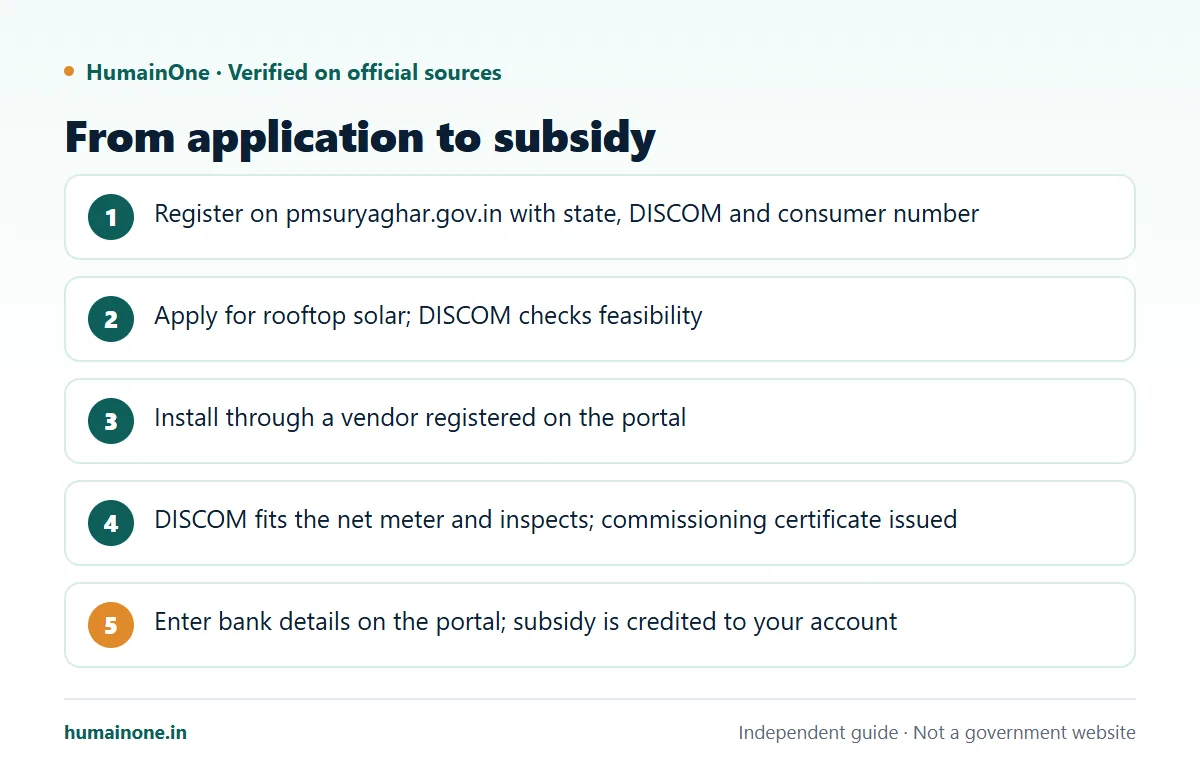
- Register on pmsuryaghar.gov.in: choose your state and DISCOM, enter your electricity consumer number, mobile number and email.
- Apply for rooftop solar with the login. The DISCOM checks feasibility and approves.
- Choose a registered vendor (listed on the portal) and get the system installed. Agree on price, warranty and service in writing.
- Submit the installation details; the DISCOM installs the net meter and inspects the system. A commissioning certificate is generated on the portal.
- Enter your bank account details on the portal. The subsidy is credited to your bank account.
Loan: if you need finance, apply for a collateral-free rooftop solar loan through the portal's banking options; the Cabinet release mentions rates of around 7% for systems up to 3 kW.
Before you sign with an installer
- Ask for the vendor's registration on the National Portal for your DISCOM.
- The subsidy is paid to you, after commissioning — not deducted by the vendor upfront unless clearly written.
- Check module and inverter make, warranty years, and who handles maintenance.
- Never pay anyone for "subsidy approval". The application on the portal is free.
Fake "PM Surya Ghar registration" websites and WhatsApp forms collect fees and personal data. Type pmsuryaghar.gov.in yourself — see how to spot a real government website and fake scheme messages.
Deadline: the National Portal shows the scheme closes on 31 March 2027. Installation, net metering and inspection all take time, so apply well before that.
Frequently asked questions
How much subsidy is given for a 3 kW rooftop solar under PM Surya Ghar?
₹78,000 — ₹30,000 per kW for the first 2 kW plus ₹18,000 for the third kW. There is no extra subsidy above 3 kW.
How do I apply for PM Surya Ghar Yojana?
Register on pmsuryaghar.gov.in with your state, DISCOM and electricity consumer number, apply for rooftop solar, and install through a registered vendor after DISCOM approval.
What is the last date for PM Surya Ghar Yojana?
The National Portal says the scheme closes on 31 March 2027.
Will I really get 300 units free every month?
A 3 kW system generates more than 300 units a month on average, which offsets your bill through net metering. Actual output depends on location, roof and shade.
Who gets the subsidy money — me or the vendor?
The subsidy is credited to the consumer's bank account after the system is installed, net-metered and inspected.
Can a housing society apply?
Yes. Group housing societies and RWAs get ₹18,000 per kW for common facilities, up to 500 kW.
Official links
Use only these government websites. HumainOne is not connected to any of them.
- PM Surya Ghar National PortalApply, vendors, status
- PIB — Cabinet approves PM Surya Ghar (29 Feb 2024)Subsidy, loans, 300 units
- MNRE — criteria and subsidy table (PIB annexure)₹30,000 / ₹18,000 per kW
Disclaimer: HumainOne is an independent information website. We are not affiliated with UIDAI, the Income Tax Department, EPFO, NPCI, the Election Commission, the Government of Maharashtra or any government body. We do not accept applications, documents or fees. Information is checked against official sources on the date shown but rules change — always confirm on the official website before acting. Calculators give estimates, not official figures, and this is not tax or legal advice.