PM-KISAN eKYC: three ways to complete it (OTP, face authentication on the app, or fingerprint at a CSC) and how to check it is done
eKYC is mandatory for every farmer registered under PM-KISAN (₹6,000 a year in three instalments). You can do it in three ways: (1) OTP on pmkisan.gov.in → e-KYC — needs a mobile number linked to Aadhaar; (2) face authentication in the PM-KISAN mobile app with the Aadhaar Face RD app — free, from home, no OTP needed; (3) fingerprint (biometric) at a Common Service Centre (CSC) or State Seva Kendra — convenience fee ₹15. The eKYC status updates after 24 hours; check it on Know Your Status. The 24th instalment was released on 30 October 2026.
Key facts Last verified: 31 Oct 2026
| Item | Details | Source |
|---|---|---|
| Mandatory | eKYC is mandatory for PM-KISAN registered farmers | PM-KISAN portal |
| Three modes | OTP (portal and app), biometric (CSCs and State Seva Kendras), face authentication (PM-KISAN app) | Dept of Agriculture — Note on modes of eKYC |
| CSC fee | Convenience fee ₹15 for eKYC | Dept of Agriculture — Note on modes of eKYC |
| Status | eKYC done by any mode shows in beneficiary status after 24 hours | Dept of Agriculture — Note on modes of eKYC |
| 24th instalment | Released by the Prime Minister on 30 October 2026 | PM-KISAN portal |
| Benefit | ₹6,000 a year in three equal instalments to Aadhaar-seeded bank accounts | Dept of Agriculture — Note on modes of eKYC |
Dnyaneshwar, a farmer near Beed, got the last PM-KISAN instalment but his neighbour Sakharam did not. Sakharam's mobile number is not linked to his Aadhaar, so the OTP never came, and he gave up on eKYC. He does not need to travel or pay an agent — he can finish it on his son's phone with a face scan in ten minutes.
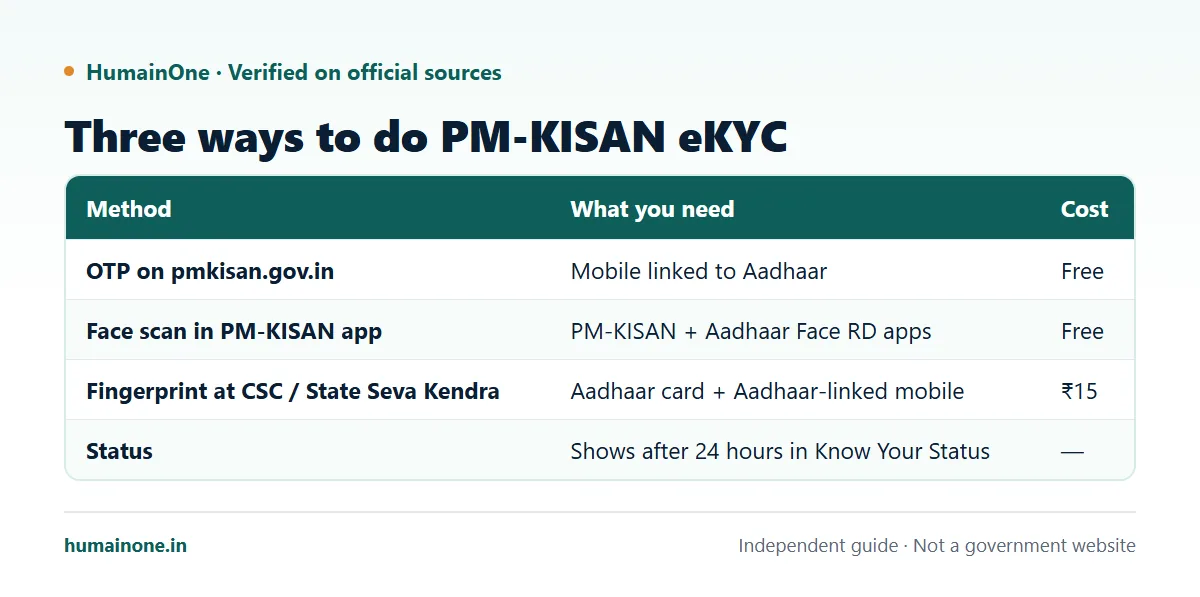
Which eKYC method should you use?
| Method | What you need | Cost | Best for |
|---|---|---|---|
| OTP on pmkisan.gov.in or the app | Aadhaar number + mobile number linked to Aadhaar | Free | Farmers whose mobile is linked to Aadhaar |
| Face authentication in the PM-KISAN app | Android phone, PM-KISAN app + Aadhaar Face RD app, your PM-KISAN registered mobile to log in | Free | Farmers whose Aadhaar mobile is not linked or OTP fails |
| Fingerprint (biometric) at CSC / State Seva Kendra | Aadhaar card, Aadhaar-linked mobile | ₹15 convenience fee | Elderly farmers or those without a smartphone |
Method 1 — OTP eKYC on the website
- Open pmkisan.gov.in (type it yourself).
- Click e-KYC (top right).
- Enter your Aadhaar number and search.
- Enter the OTP sent to your Aadhaar-linked mobile and submit.
- You see a success message. Check status after 24 hours.
OTP not coming? Your mobile is probably not linked to Aadhaar. Use face authentication below, or link the number at an Aadhaar centre — see update mobile number in Aadhaar.
Method 2 — Face authentication on the PM-KISAN app

- From the Google Play Store, install the PM-KISAN app and the Aadhaar Face RD app.
- Open PM-KISAN and log in with your PM-KISAN registered mobile number.
- You land on the beneficiary status page.
- If eKYC status is "No", tap eKYC, enter your Aadhaar number and give consent to scan your face.
- Hold the phone in good light and scan your face. eKYC is complete.
Sakharam did exactly this. The face scan works for the farmer whose Aadhaar it is — so the farmer must be in front of the camera.
Method 3 — Fingerprint at a CSC
Go to your nearest Common Service Centre or State Seva Kendra with your Aadhaar card and Aadhaar-linked mobile. The operator does the biometric authentication. The official convenience fee is ₹15 — don't pay more. Find a CSC at locator.csccloud.in.
eKYC done but money still not received?
eKYC is only one of the checks. Open Know Your Status (KYS) on pmkisan.gov.in or in the app and look at each line:
| KYS shows | What to do |
|---|---|
| eKYC: No | Do eKYC by one of the three methods above |
| Aadhaar bank seeding: No | Seed Aadhaar to your bank account — see Aadhaar-seeded vs linked bank account |
| Land seeding: No | Contact your local agriculture office to get land records verified |
| Benefit "withheld" | The Department is physically verifying some suspected cases, e.g. land acquired after 01-02-2019 or more than one family member (husband and wife) receiving the benefit. Wait for verification or contact the agriculture office |
For Maharashtra farmers, the state's Namo Shetkari money follows the same records — see PM-KISAN / Namo Shetkari not received. For any DBT that did not arrive, use the DBT not received checker.
eKYC is free online and ₹15 at a CSC. Never share your Aadhaar OTP with callers who say they will "complete PM-KISAN KYC". Don't install "PM Kisan" APK files sent on WhatsApp — only the app from the Play Store. See fake government scheme messages.
Frequently asked questions
Is eKYC mandatory for PM-KISAN?
Yes. The PM-KISAN portal says eKYC is mandatory for all registered farmers.
How can I do PM-KISAN eKYC without an Aadhaar-linked mobile?
Use face authentication in the PM-KISAN app with the Aadhaar Face RD app, logging in with your PM-KISAN registered mobile, or do biometric eKYC at a CSC.
What is the fee for PM-KISAN eKYC at a CSC?
The official convenience fee is ₹15. OTP and face-authentication eKYC are free.
How long does eKYC take to show?
The status of eKYC done by any method is reflected in the beneficiary status after 24 hours.
When is the PM-KISAN 24th instalment?
The Prime Minister released the 24th instalment on 30 October 2026, as announced on the PM-KISAN portal.
How do I check if my PM-KISAN eKYC is done?
Open Know Your Status on pmkisan.gov.in or in the PM-KISAN app and check the eKYC line. The Kisan eMitra chatbot also shows it.
Official links
Use only these government websites. HumainOne is not connected to any of them.
- PM-KISAN portal — eKYC and Know Your StatuseKYC mandatory, 24th instalment date
- Note on modes and processes of eKYC (Dept of Agriculture & Farmers Welfare)OTP, face and biometric steps, ₹15 fee
- CSC locatorFind a Common Service Centre
Disclaimer: HumainOne is an independent information website. We are not affiliated with UIDAI, the Income Tax Department, EPFO, NPCI, the Election Commission, the Government of Maharashtra or any government body. We do not accept applications, documents or fees. Information is checked against official sources on the date shown but rules change — always confirm on the official website before acting. Calculators give estimates, not official figures, and this is not tax or legal advice.